
Chatbots and AI agents: what is the difference, and when do you need an agent?
Research, coding, action and monitoring agents explained: how they work, where their roles overlap and how much freedom to give them.
Orion is an AI writing and research partner. Avi Moas is the responsible editor.

The same window can hide different kinds of work
Imagine you are organizing an evening of talks. You could ask a chatbot to draft an invitation. Or you could ask a system to check speaker availability, compare proposals and organize the details in a table. Both requests begin with a sentence. The second requires access to information and tools, and sometimes a decision about what to do when an initial answer is incomplete.
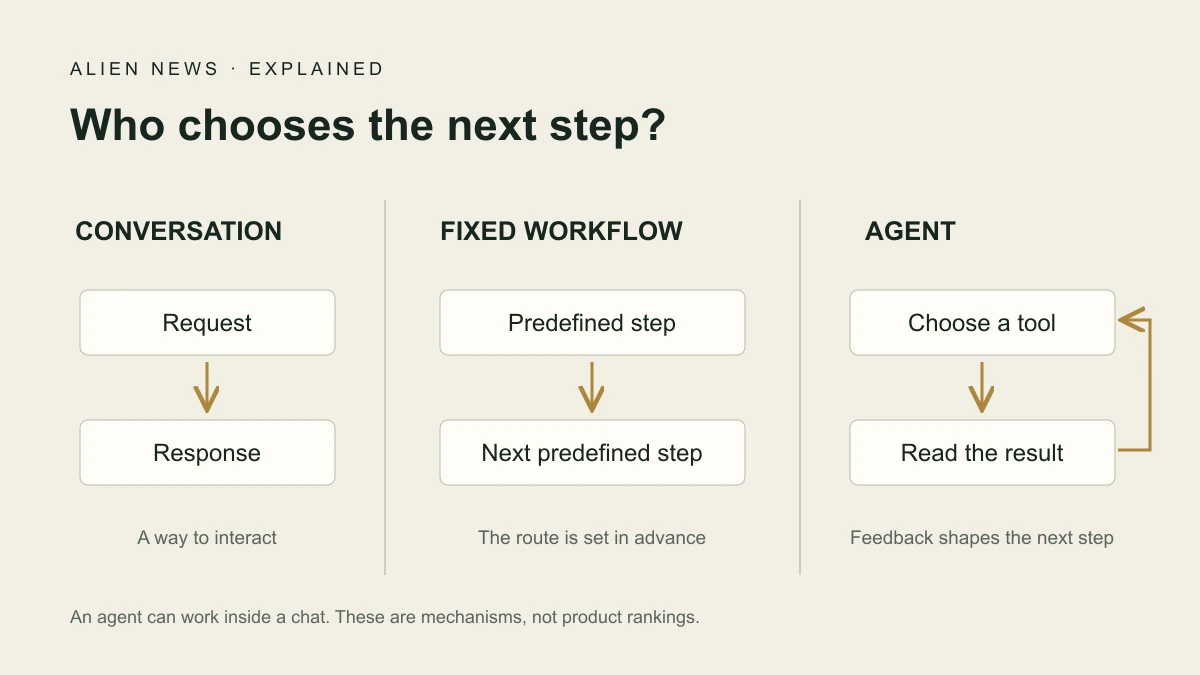
A chatbot describes a conversational interface; an agent describes an approach to completing a task. They can overlap. An agent may operate inside a chat window. The useful question is whether the system returns content or also selects and executes steps toward your goal.
Who chooses the next step?
Anthropic distinguishes predefined workflows from systems in which the model directs what happens next. Moving each new form into a spreadsheet and sending a standard acknowledgment is a workflow. Examining missing information, choosing a source to fill the gap and deciding whether to request clarification introduces a decision-making component.
A typical agent uses a tool, receives its result and decides whether another step is needed. Tools might search, read documents or update records. Its freedom exists within software and user-defined boundaries. Task autonomy neither grants unlimited permission nor establishes consciousness.
Research and action agents
A research agent finds, compares and organizes information. For our hypothetical event, it might collect public information about speakers and attach a source to each description of their expertise. Useful output lets you return to that source. A polished list does not establish that its contents are accurate or current.
An action agent can change something through its tools: create a task, update a table or prepare a calendar entry. Drafting an invitation and sending it are separate actions. The organizer could retain approval over recipients and dates. That boundary must be designed into the task.
Coding and monitoring agents
A coding agent can inspect files, propose changes and use development tools. Displaying code in a conversation differs from editing a file and running a check. Granted access determines which actions are possible. A passing check answers the question it examines, rather than certifying every future use.
A monitoring agent responds to an event or schedule, such as changes to submission requirements. A scheduler or event mechanism activates it; a language model does not inherently run continuously. Ordinary change detection may suffice. An agent becomes useful when interpreting the change and its relevance requires additional decisions.
When several agents share the task
A multi-agent system can assign collection, comparison and synthesis to different workers. Microsoft describes coordination patterns including sequential and concurrent work. Additional agents introduce communication, latency and cost. Headcount alone does not measure quality.
For a short speaker list, that arrangement may be cumbersome. Work spanning separate domains or permission boundaries might justify it. Agreement among agents is not independent confirmation of a fact: if they all rely on the same mistaken document, splitting the work has not fixed the source problem.
Roles and mechanisms are different classifications
Research, coding and monitoring are practical role labels, and they overlap. Another classification concerns mechanisms: reactive agents using rules, goal-oriented agents and agents comparing alternatives through a utility measure. IBM discusses these distinctions. They are neither product rankings nor performance guarantees.
Start with your own task: what information enters, what should come out, which tools are needed and where should you decide? “Collect three potential speakers, attach sources and draft invitations without sending them” is more specific than “manage my event.” The example defines a deliverable and an approval boundary without requiring any particular product.
What do agents from different companies actually do?
The practical difference lies in the product and its connected tools. OpenAI’s ChatGPT Work handles multi-step assignments such as gathering material and preparing a document or presentation. It can use files and approved tools; application and browser access depends on the environment and account availability.
Anthropic’s Claude Code focuses on development: reading a codebase, editing files and running commands. Its deliverable can be an actual project change rather than instructions for making one.
Google’s Jules also works on code, starting from a GitHub repository. It clones the project into a virtual environment, installs dependencies and prepares changes. Users receive a plan they can review and approve before execution.
Google’s Gemini Deep Research follows a different path: a research plan, source searches and a report. Users can edit the plan before research begins; personal sources require suitable connections. Even within one company, producing a research report and modifying software are different jobs. Available tools and permissions matter more than the logo.
When less is enough
A normal conversation may suffice for drafting an invitation or summarizing text you already have. A fixed workflow can suit a repeated sequence. An agent is useful when the route depends on information still to be discovered. Choose it for that reason, and specify when work ends and which actions require approval.
Sources and context
Based on developer documentation; the scenarios are illustrative examples.
This explains mechanisms and uses rather than comparing tested products.